Inkjet, HP Indigo or Nano print®: Comparing apples and oranges?
Imagine you’re organising a batch of posters for your next big event. You’ve decided on the size, paper and design. All seems straightforward until you’re faced with the question: which printing technique will you choose—Inkjet, HP Indigo, or Landa Nano®?
Don’t panic. While these terms might sound like industry jargon, each printing method has strengths and best uses. In this guide, we’ll break it all down for you.
Article Contents
Digital Printing? What the heck is digital printing?
The printing techniques we’re exploring here (inkjet, HP Indigo, and Landa Nano®) are all forms of digital printing. Digital printing is ideal for smaller runs, typically up to 500 pieces. Why? It removes the need for expensive plates required in lithographic offset printing, instead transferring ink directly to the paper. This significantly reduces setup costs, making it a cost-effective solution for smaller projects.
CMYK vs PMS
Digital printing works exclusively with designs in a CMYK colour profile. If your project requires PMS colours, Litho offset printing is your go-to option.
TIP: Want to understand more about colour systems? Check out our blog: ‘Everything You Need to Know About RGB, PMS, and CMYK Colours’.
A closer look: Inkjet, HP Indigo, and Landa Nano®
Now that you know more about the benefits of digital printing, let’s take it a step further. In our app, you’ll find three options for many products if you’re considering digital printing: inkjet, HP Indigo, and (for posters) Landa Nano®. But what exactly makes the different techniques different? We’ll explain.
Inkjet Printing: Fast, high-quality, and cost-effective
Inkjet technology uses liquid ink, which is applied directly to the material. It has been increasing in popularity in recent years, thanks to its constantly improving quality—now rivalling that of HP Indigo. Our choice of inkjet machinery is the Canon varioPrint, but other manufacturers also use inkjet technology.

The benefits of inkjet printing:
- Best value for smaller print runs
Inkjet is the most economical digital option for short runs. - Versatile Material Options:
Inkjet can print not just on paper but also on materials like cardboard or fabric. In our app, for example, our letterbox boxes (made of corrugated cardboard) can be printed using inkjet technology.
The disadvantages of inkjet printing:
- Not suitable for large format
Want to print a poster in B2 format or larger? Inkjet printing isn’t (yet) an option. The reason is simple: these paper sizes don’t fit our inkjet printers. - Limited paper options
Inkjet printing offers fewer paper options than HP Indigo. Currently, inkjet is available with the following paper types: satin mc, silk mc, hv offset, and Biotop®.
HP Indigo: More formats, more materials
HP Indigo is a patented printing technology that uses liquid inks. The inks are applied to the paper using an electromagnetic process.

The benefits of HP Indigo:
- Personalisation
A key advantage of HP Indigo over inkjet technology: with HP Indigo, you can easily add variable data (e.g.first name or address) to your design at no extra cost. This makes HP Indigo ideal for direct mail applications or other addressed mail. - More paper types and weights
Another advantage of HP Indigo: this technology gives you a wider choice of paper types. Want to go for Muskat Brown kraft, Tintoretto Gesso, or sustainable Rebello paper? With HP Indigo, that’s no problem.
Good to know: not all paper types are HP Indigo certified. In the product builder in the app, you can always see exactly which paper types are available for HP Indigo and which are not. - Finishes and enhancements
Finally, HP Indigo is a suitable printing technique if you want to add a special finish or (spot) enhancement to your prints. Consider, for example, foil printing or UV varnish. This is not (yet) possible with inkjet and Landa Nano® .
The disadvantages of HP Indigo:
- HP Indigo is (a bit) more expensive than inkjet
Like inkjet and Landa Nano®, HP Indigo is best suited for smaller print runs. HP Indigo is generally a bit more expensive than inkjet. However, you do get the flexibility in paper and finishing options in return. - Uncoated paper
HP Indigo generates static electricity. This occasionally causes small spots on uncoated paper.
Landa Nano®: Large-format digital printing

Landa Nano® is a form of inkjet printing, but a very special one. This printing technique uses ultra-thin layers of ink (a nanometer is one billionth of a meter) that deliver razor-sharp detail and vibrant colors.
Fun fact: Benny Landa, the creator of Landa Nano®, was also the founder of HP Indigo printing technology.
The benefits of Landa Nano®:
- Large-format printing
Landa Nano® is currently only available in the Print.com app for posters starting from A3 size. This is precisely the major advantage of this printing technique: you benefit from the advantages of digital printing, but in larger formats. Think of posters in B1 format.
The disadvantages of Landa Nano®:
- Limited options
At Print.com, we currently offer Landa Nano® on silk, satin, machine-coated paper, Blueback, and 170-gram HVO offset, starting at A4 large (148mm x 420mm). Need a smaller format? Then Landa Nano® isn’t (yet) an option.
Sustainability
Perhaps you’re wondering which printing technique is the most sustainable choice for your project? The best answer is: it depends. The inks, the paper, and how waste is handled are all variables that influence the sustainability of your final product. On average, inkjet is the most sustainable of the three options. Inkjet machines are relatively energy-efficient and use water-based inks. This reduces the amount of (chemical) waste produced in the printing process.
Pros and Cons
Below, we’ve clearly listed the pros and cons of the various techniques. This way, you can see at a glance which technique is best suited for your project.
| Inkjet | Landa Nano | Indigo | |
| Personalisation | Not possible (for now) | Not possible (for now) | Possible |
| Material options | Limited | Limited | Many options |
| Paper size | Up to B2 | From A3 | Many options |
| Finishing options | Not possible | Not possible | Possible |
| Speed | Urgent delivery available | Urgent delivery available | Urgent delivery available |
| Small/large editions | Small editions | Small editions | Small editions |
| Sustainability | More sustainable than litho | More sustainable than litho | More sustainable than litho |
| PMS-printing | No | No | No |
| Cost | Most affordable | More affordable | Economical |

Request your set of free samples
No matter whether you choose the affordability of inkjet, the large-format capabilities of Landa Nano®, or the versatility of HP Indigo, there’s a digital printing technique perfectly suited to every project.
Curious about how the colour differences stack up?
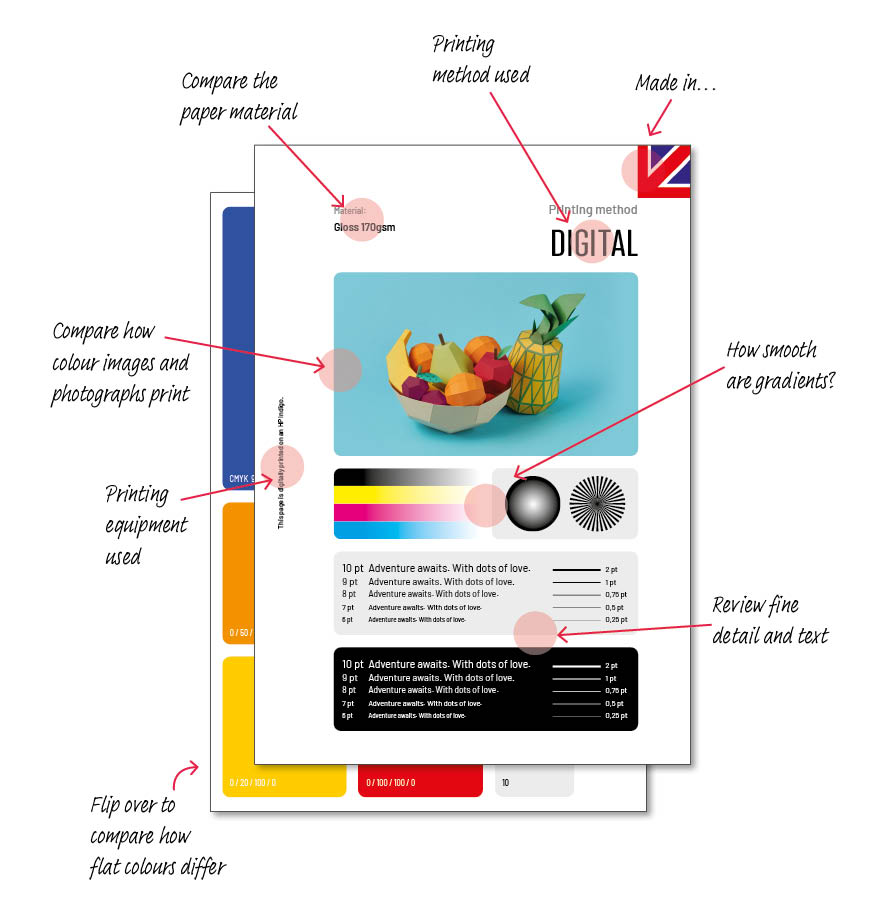
We’d love to send you a set of samples; the same design, same paper, printed using three different printing techniques, produced in two production regions 🇬🇧 🇪🇺. It’s a fantastic way to see the differences side by side!
Good to know: The samples are unbranded so they can be used with your own customer to help explain the pros and cons of each printing method.
What’s included in the pack?
🇪🇺 Samples (No flash in top right corner)
- Inkjet – printed on a Canon varioPRINT
- Uncoated 170gsm
- Gloss 170gsm
- Bio Top 160gsm (Green option)
- Digital – printed on an HP Indigo
- Uncoated 170gsm
- Gloss 170gsm
- Bio Top 160gsm (Green option)
- Nano – printed on a Landa Nano®
- Uncoated 170gsm
- Gloss 170gsm
- Bio Top 160gsm (Green option)
🇬🇧 Samples (Union Jack flash, top right corner)
- Inkjet – printed on a Canon varioPRINT
- Uncoated 170gsm
- Gloss 170gsm
- Silk 170gsm
- Digital – printed on an HP Indigo
- Uncoated 170gsm
- Gloss 170gsm
- Silk 170gsm
One design, subtle variations: Spot the differences
By printing the same design on every sheet, we can see how the artwork’s appearance shifts slightly depending on the paper type and the equipment used. These samples also highlight texture, weight, finish, and overall print quality, helping you choose the combination that best suits your project.
Uncoated v Gloss v Silk finish
The same colour can look different on different types of paper, because some absorb the ink more than others. Generally on uncoated papers, colours will look darker or flatter compared to a gloss or silk finish, where the ink sits more on the surface of the paper, and the sheen reflects light, resulting in a brighter more vibrant shade.
Inkjet v Digital v Nano
Different machinery techniques cope with design elements like fine text, fine detail and gradients better then others. The HP Indigo is generally is considered the industry leader among these options. It is widely recognised as providing the closest digital match to Lithographic offset printing quality. However, the Landa is designed to provide high gloss, a very broad colour gamut, and sharp details also. While excellent, Inket is sometimes considered a step below the “offset-like” quality and precision of the HP Indigo, however this technology has made significant progress recently, and benefits from its speed, reliability and cost-effectiveness.
Good to know: When comparing the paper options, you can also see differing levels of whiteness. Bio papers tend to be unbleached resulting in an off white, creamer looking paper. The base white colour also has an impact on how the finished design looks.
Want to take at our extensive product range? Log in or register for free.
0800 098 1026 | hello@print.com
Follow us on socials:


Related articles
-

This is how creatives and print professionals are boosting their visibility with a Pop-up Store
25 August 2026Want to attract more visitors to your site and inspire them straight away with your product range? Print.com’s Pop-up Store is your smart marketing assistant. Ideal for anyone who sells printed products. You can launch it on your own website in just a few clicks and share it just as easily via your social media or newsletter.